Creating a WordPress website isn’t about rushing through an installer and hoping everything works out later.
The sites that perform well long-term usually have one thing in common:
they’re planned before they’re built.
Before you touch WordPress itself, you should understand what you’re building, why you’re building it, and how it’s expected to grow. This approach saves time, prevents rework, and avoids many common SEO and structural problems down the road.
Let’s walk through the process properly.
1. Plan Your Website Before Installing Anything
Before creating a WordPress website, take a moment to clarify the purpose of your site.
Ask yourself:
- Is this a content site, company website, or personal blog?
- Will it stay informational, or eventually sell products?
- Will SEO and content marketing be important long-term?
If you’re planning to build an online store in the future, it’s worth understanding WooCommerce early, as it can influence theme choice, hosting, and site structure.
You can explore this in more detail here:
How to Create a WooCommerce Store
Good planning at this stage prevents painful changes later.
2. Choose and Register a Domain Name
Your domain name is more than just a web address. It’s part of your brand, your marketing, and how people remember you.
Before moving forward, you should already have:
- A finalized domain name
- The domain registered
- DNS ready to connect to your hosting
If you’re still unsure how to choose a domain, start here:
How to Choose and Register a Domain Name
Once your domain is secured, you can focus on the technical side without distractions.
3. Choose the Right WordPress Hosting
Hosting plays a major role in how fast, secure, and reliable your WordPress site will be.
At this stage, you should consider:
- Expected traffic
- Performance requirements
- Whether you plan to run WooCommerce
- How much technical control you want
WordPress will run on many hosting environments, but not all hosting is equal.
For a deeper breakdown, see:
How to Choose the Right WordPress Hosting
Choosing the right host early helps avoid migrations later.
4. Install WordPress
Once your domain and hosting are ready, you can install WordPress.
WordPress is free, open-source software, and the only official source is:
Download WordPress from the official website
Most hosting providers offer:
- One-click WordPress installation, or
- Manual installation via file upload
Regardless of the method, a successful installation means:
- You can access the WordPress admin dashboard
- You can create posts and pages
- Your site loads correctly on the front end
At this point, WordPress is installed — but your site is not ready to go live yet.
5. Don’t Publish Content Immediately (Set This First)
This is one of the most overlooked steps.
After installing WordPress, you should configure essential settings before publishing content, especially if your site is not finished.
Key settings to review:
- Site title and tagline
- Permalink structure (use “Post name” in most cases)
- Language, timezone, and date format
Most importantly, if your content and structure are not finalized:
In the WordPress admin dashboard, go to Settings → Reading and enable the option “Discourage search engines from indexing this site”
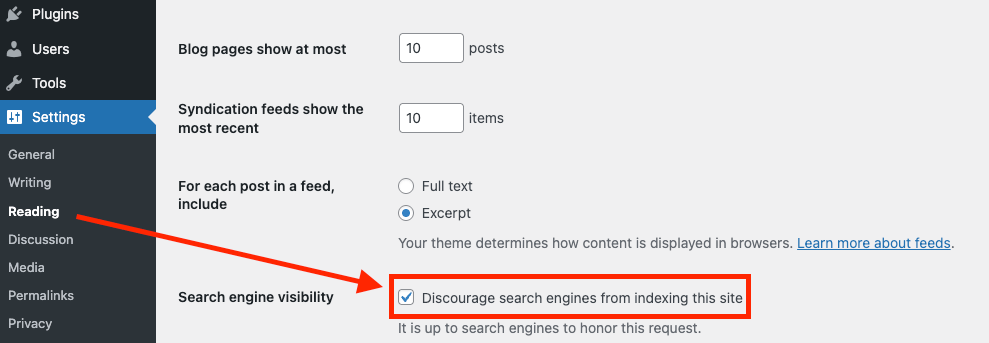
This prevents:
- Half-finished pages being indexed
- SEO issues caused by early structure changes
- Search engines do not fully understand your website.
Once your site is ready, you can disable this setting safely.
Additionally, it’s a good idea to enable maintenance mode during website development.
We recommend using Slim Maintenance Mode, a lightweight plugin that allows you to display a clean maintenance page to visitors while keeping the site accessible to administrators and logged-in users.
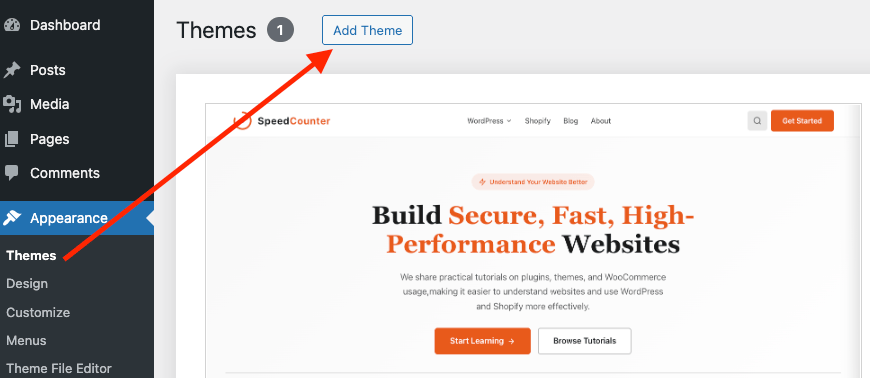
6. Choose a WordPress Theme That Matches Your Goals
A theme doesn’t determine whether you can sell products or publish content — WordPress handles that.
However, your theme directly affects:
- User experience
- Conversion rates
- Long-term maintenance effort
When choosing a theme, look for:
- Clean structure and active updates
- Compatibility with modern WordPress features
- Support for plugins you plan to use
If your site may become an online store, choose a theme designed with eCommerce in mind from the start.
When choosing a WordPress theme, you generally have two solid options:
Official WordPress themes — Browse themes available in the official WordPress theme directory. These themes are reviewed by the WordPress team and follow core coding and security standards.
Premium WordPress themes — You can also explore professionally designed WordPress themes from theme marketplaces such as ThemeForest, which often offer more advanced layouts and customization options.
7. Install Only Essential Plugins
Plugins extend WordPress, but more plugins doesn’t mean a better site.
Each plugin should solve a clear problem, such as:
- SEO optimization
- Security
- Backups
- Performance caching
A good rule of thumb:
If a plugin doesn’t serve a clear purpose, you probably don’t need it.
Keeping your plugin list lean improves stability and performance.
8. Design Your Content Structure Before Writing
Before publishing your first article, plan:
- Core pages (About, Contact, Services, etc.)
- Categories and content hierarchy
- Long-term content strategy
For content-driven sites, structure matters more than individual posts.
A clear structure improves user navigation and search engine understanding.
9. Final Checks Before Launch
Before making your WordPress site public, review the following:
- Pages display correctly on mobile
- Navigation works as expected
- Forms and links function properly
- Search engine indexing is enabled only when ready
If you plan to add WooCommerce later, this is also a good time to confirm your site structure can support it.
Final Thoughts
Creating a WordPress website is not a race.
When you focus on planning, structure, and long-term goals first, WordPress becomes a powerful tool rather than something you constantly fix and rework.
Build with intention, and WordPress will scale with you.